“Dramatic Sketch Cinematic Effect Photoshop Action” has been added to your cart.
View cart
Showing 161–180 of 543 resultsSorted by price: low to high
-

$6.99
A Photoshop action that produces double-exposure / duotone effects for portraits, blending colored floral textures over a high-contrast black-and-white base. Ideal for fashion, editorial and social-media graphics where a dreamy, artistic look is required.
-

$6.99
Photoshop-based double-exposure effect packaged as an action/product with a layered PSD Smart Object template; combines a portrait with landscape/texture overlays to create a high-key, artistic double-exposure look. Requires RGB, 8‑bit images and the English version of Photoshop (see included Readme).
-

$6.99
Photoshop action package for creating double-exposure portrait composites; includes a layered PSD example and a README with usage notes (requires RGB 8‑bit and editing the Smart Object).
-
$6.99
Photoshop action and PSD Smart-Object template that creates double-exposure silhouette composites (insert your photo into the provided Smart Object). Requires RGB, 8‑bit images and English-version Photoshop.
-

$6.99
Layered PSD action that creates a double-exposure photo composite using a Smart Object; requires Photoshop (English), RGB 8‑bit images — open the Smart Object, paste your photo and save to apply. Includes a preview mock showing a portrait blended with a cityscape and a title band.
-

$6.99
A Photoshop action that creates a dramatic, high-contrast black-and-white portrait effect; the package includes a PSD (Smart Object) sample and requires Photoshop (English), a photo in RGB 8‑bit and a Smart Object workflow.
-

$6.99
PSD-based Photoshop action that applies an intense red, high-contrast editorial effect via a Smart Object; open the PSD, replace the Smart Object contents with your photo and save. Requires RGB colour mode, 8‑bit and English Photoshop (per Readme).
-

$6.99
A Photoshop action plus PSD Smart Object that turns portraits into a dramatic, cinematic pencil/charcoal sketch with textured grain; replace your photo inside the Smart Object and run the action. Requires RGB, 8-bit and the English version of Photoshop (see Readme for instructions).
-

$6.99
Smart-Object-based Photoshop action and layered PSD that transforms portrait photos into dramatic, cinematic pencil-sketch artworks; requires RGB, 8‑bit images and the English version of Photoshop. Install/open the PSD, place your photo into the Smart Object and run the action as described in the included Readme.
-

$6.99
Photoshop action package that produces a pencil hand-drawn / cross-hatched sketch effect from photos; delivered with a Smart Object PSD. Readme requires RGB, 8‑bit images and the English version of Photoshop — open the Smart Object, paste your photo and save to apply.
-

$6.99
Photoshop action package that produces a dreamy, pastel bokeh/light‑leak look using a Smart Object PSD; drop your photo into the Smart Object to apply soft glow and color overlays. Readme notes requirements: RGB, 8‑bit, English Photoshop.
-

$9.99
Square, duotone animated Instagram template that includes a layered PSD plus exported GIF and MP4; designed for portrait-focused social posts with bold centered headline text. Ideal for fashion/beauty or lifestyle feed posts that need a high‑contrast, stylish look.
-

$6.99
PSD-based Photoshop action that applies a duotone/ink colour treatment via a Smart Object; requires RGB 8-bit images and the English version of Photoshop. Includes a layered PSD with Smart Object for easy photo replacement.
-
$6.99
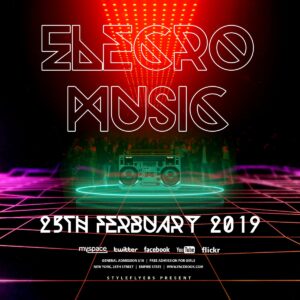
Photoshop action package titled ‘Electro Music PS Action’ that includes a layered animated PSD social-post template for creating neon, retro-futuristic DJ/club posters and event promotions.
-

$9.99
Square animated social-media flyer template in layered PSD with neon / synthwave styling, designed for promoting electronic music, club nights and DJ events on Instagram, Facebook and Twitter.
-

$9.99
Layered PSD party/club flyer template featuring a central DJ portrait, neon outlined headline, geometric network lines and speaker graphics for promoting electronic/EDM nights. Editable social icons and event text placeholders make it suitable as a starting template for nightlife promotions.
-

$6.99
Photoshop action that adds glowing energy/light-line streaks, bokeh and intense center glow to photos; includes a sample PSD and MP4 demo and requires placing your image into a Smart Object (use RGB, 8-bit, English Photoshop).
-

$6.99
Photoshop action that applies neon/electric glows, spark and particle textures to portraits; includes a smart-object PSD sample for inserting photos and producing club/EDM-style promotional images. Requires Photoshop (RGB, 8-bit) and use of the Smart Object as described in the readme.
-

$6.99
A Photoshop action packaged in a PSD that converts photos into a high-contrast engraved/halftone portrait using a Smart Object. Readme notes: image must be RGB, 8-bit and use the English version of Photoshop; open the Smart Object, paste your photo and save to run the effect.
-

$6.99
Photoshop action product (delivered with a PSD smart-object template) that converts photos into high-contrast, engraved line portraits; requires Photoshop (English), RGB color mode and 8-bit images — open the Smart Object and paste your photo to apply the effect.
