“HDR Photoshop PS Action” has been added to your cart.
View cart
Showing 121–140 of 295 resultsSorted by price: low to high
-

$6.99
Photoshop ‘Glitch’ action package supplied with a Smart-Object PSD; applies a glitch/digital-distortion look to photos. Requires Photoshop (English), image in RGB color mode and 8‑bit; workflow: open the Smart Object, paste your photo and save.
-
$6.99
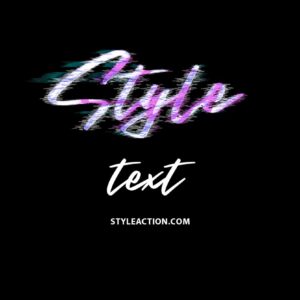
Photoshop action package that produces a glitch/distorted text effect and includes a layered PSD smart-object for easy text replacement; open the PSD, edit the smart object text and save to apply the effect.
-

$6.99
Photoshop action package (includes a PSD sample) that converts photos — especially portraits — into a metallic gold, high‑gloss stylised look. Requires RGB, 8‑bit images and use of the PSD Smart Object as described in the included Readme.
-

$9.99
Layered PSD that provides a gold text effect using a Smart Object—open the PSD, edit text inside the Smart Object and save to apply the effect. Readme instructs editing the Smart Object; preview not included in the archive.
-

$6.99
Photoshop action that produces a warm golden-hour look with bokeh-style sparkles and soft glow; installs/uses a Smart Object sample PSD and requires RGB 8-bit images and the English version of Photoshop.
-

$6.99
A Photoshop PSD designed to apply a gradient-style effect using a Smart Object workflow; open the Smart Object, paste your photo and save. Readme notes require RGB color mode, 8‑bit images and the English version of Photoshop.
-

$6.99
Photoshop action that applies a two‑tone gradient/duotone color grade; includes a layered PSD using a smart object — insert your photo into the smart object and save to apply. Requires Photoshop (English), image in RGB and 8‑bit per the included Readme.
-

$6.99
Photoshop action packaged with a PSD Smart Object that applies a multi-colour gradient/duotone colour wash to photos; requires RGB, 8‑bit images and use of the Smart Object as described in the Readme.
-

$9.99
A layered PSD flyer template titled “Guest Artist” for promoting guest-artist appearances and events; archive includes the main PSD, a Facebook-preview PSD and a readme PDF. Suitable as a starting template for event and social-media promotions.
-

$6.99
Photoshop action that converts photos into a minimal two-tone halftone portrait; includes a sample PSD and requires placing your photo into a Smart Object (use RGB, 8‑bit and English Photoshop).
-

$9.99
Layered Instagram post template for Halloween-themed promotions and event posts, supplied as editable PSD files suitable for swapping images and editing text. Ideal as a starting layout for party invites, event announcements or Halloween sales on social media.
-

$6.99
A Photoshop PSD action that turns photos into a hand-drawn pencil/sketch look using a Smart Object; requires RGB, 8‑bit images and the English version of Photoshop. Install/open the PSD, replace the Smart Object photo and save to apply the effect.
-

$9.99
Package contains layered Photoshop templates named ‘happy hour Story.psd’ and ‘happy hour Banner Template.psd’ intended for happy-hour and bar/restaurant promotions; archive also includes a readme PDF. Use as starting templates for social-story posts and digital banners or to adapt into print/digital promotional flyers.
-

$6.99
Photoshop action-style product that produces an HDR black-and-white, high-contrast look; delivered as a layered PSD with a Smart Object — open the Smart Object, paste your photo and save to apply the effect. Requires Photoshop (RGB, 8-bit) and the English version as noted in the readme.
-

$6.99
Photoshop action that applies an HDR-style, high-contrast, detail-enhancing effect; archive includes a sample PSD with a Smart Object for swapping photos. Requires RGB color mode, 8‑bit images and the English version of Photoshop.
-

$6.99
A Photoshop action workflow that creates an HDR-style, high-contrast, highly saturated look for portraits and photos via a Smart Object PSD; requires RGB 8‑bit images and the English version of Photoshop.
-

$6.99
Photoshop Smart-Object based action that creates an HDR-like, high-detail, high-contrast portrait look; requires RGB 8-bit images — paste your photo into the provided Smart Object PSD and save to apply the effect.
-

$6.99
A PSD-based Photoshop action that applies an HDR-like, high-contrast stylized look via a smart-object; replace your photo inside the smart object and save. Readme notes require RGB 8-bit images and the English version of Photoshop.
-

$6.99
Photoshop action that applies an HDR‑style sharpening/clarity look to photos; package includes a PSD sample and a readme with usage steps. Requires RGB, 8‑bit images and an English version of Photoshop; workflow uses a Smart Object photo placeholder (open, replace image, save).
-

$6.99
Photoshop action that applies a warm, autumnal color grade and soft portrait enhancement using a Smart Object PSD; intended for seasonal portraits and promotional imagery. Requires RGB, 8‑bit images and the English version of Photoshop; place your photo into the included Smart Object and save to apply.
