Showing 181–196 of 196 resultsSorted by price: low to high
-

$9.99
Editable layered Photoshop flyer template for tropical/summer party promotions, featuring a smart-object main image, pre-installed color option groups and master adjustment layers. Includes named, color-coded groups and uses the free fonts Woodwarrior and True Lies (links provided in the readme).
-
$9.99
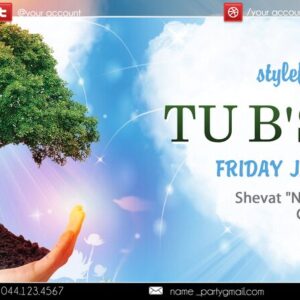
Editable, print-ready PSD flyer template for Tu BiShvat holiday events with layered, color-coded groups, Smart Object main image and multiple color-option groups; uses free fonts (Myriad Pro, m_Brody, Century Schoolbook).
-

$9.99
Layered Photoshop flyer template titled ‘Ugly Sweaters’ for holiday/party promotions; fully editable PSD with smart‑object main image, organized color‑coded layers, master adjustments and pre-installed color option groups. Uses free fonts Myriad Pro and Ravie and includes bleed for print.
-

$6.99
A Photoshop action workflow (Vector Painting PS Action) that automates a vector-style painting effect and includes a PSD with a Smart Object where you paste your photo; requires RGB, 8‑bit and the English Photoshop version.
-

$6.99
Photoshop action packaged with a Smart Object PSD that converts photos into a vector-style line-art/sketch look. Requires RGB, 8‑bit images and use of the Smart Object workflow (instructions in Readme).
-

$6.99
Photoshop action package that produces a vector-style sketch/line-art effect using a PSD smart-object template; install/open the PSD, edit the Smart Object by pasting your photo, and follow the included steps. Requires Photoshop in English, image in RGB and 8‑bit color mode per the Readme.
-

$6.99
A Photoshop PSD action workflow that applies a vintage black-and-white/monochrome effect; delivered as a layered PSD with a Smart Object that you replace with your RGB 8‑bit photo. Readme includes usage steps and Photoshop requirements.
-

$9.99
Layered PSD template that applies a vintage, colorful photo effect via a Smart Object placeholder; intended for RGB 8-bit photos and requires the English version of Photoshop. Includes a Readme with usage steps for replacing the Smart Object.
-

$6.99
A Photoshop action (package titled Vintage Grim Dark Effect) that applies a vintage, grim/dark grading to photos; the download includes a PSD with a Smart Object placeholder and a readme explaining the RGB 8‑bit and English-Photoshop requirements.
-

$6.99
A Photoshop PSD-based action/template that applies a watercolor-style effect to photos; includes a layered PSD with a Smart Object placeholder. Requires Photoshop (English), image in RGB and 8-bit color mode.
-

$6.99
A Photoshop action package for wedding photography that includes a layered PSD with a Smart Object for inserting images; Readme instructs using RGB 8‑bit images and the English version of Photoshop. Open the Smart Object, paste your photo, save, then run the action.
-

$9.99
Layered, print-ready PSD flyer template for promoting winter/holiday parties; includes editable smart-object main image, pre-installed color option groups and a separate Facebook cover PSD. Readme lists the free fonts used and gives step-by-step replacement and color-adjustment instructions.
-

$9.99
Layered, print-ready PSD flyer template for promoting a World Cup of Golf / golf tournament, with editable smart-object main image, text layers and multiple pre-installed color option groups; includes a Facebook cover PSD. Uses free fonts Muro and Xtreem and provides master adjustment layers for color and contrast.
-

$6.99
PSD-based Photoshop action that applies a bold yellow monochrome/duotone treatment to portraits using a Smart Object; requires RGB, 8‑bit images and the English version of Photoshop. Replace the Smart Object contents with your photo, save, and the effect is applied.
-

$9.99
Editable Instagram post and story PSD template for casino and nightlife promotions; includes smart-object placeholders, layered and color-coded groups, color options and master adjustment layers. Free fonts listed in the readme: Myriad Pro and Starella Script.
-

$9.99
Layered PSD flyer template with a Smart Object photo placeholder for quick portrait replacement; uses a cool cyan/teal duotone look and includes a readme with instructions (requires RGB, 8-bit images and English Photoshop).
