Showing 1–20 of 163 resultsSorted by price: low to high
-

$9.99
Includes two PSD files (a flyer and a Facebook-sized variant) titled for a ‘2022 retro party’, intended as editable templates for promoting retro-themed events online and in print. Supplied files are PSD format for customization in Photoshop.
-

$9.99
Editable layered Photoshop flyer template for 80s/disco-themed parties and club events, includes smart-object photo placeholder, preinstalled color option groups and master adjustment layers; PSD is organized with color-coded groups and includes a preview PSD and print bleed. Free font used: Arial (listed in readme).
-

$9.99
Editable layered PSD flyer template and matching Facebook cover for 80s-themed party promotion, with smart-object image placeholders, pre-installed color option groups and master adjustment layers; includes font references and print bleed setup.
-

$9.99
Editable Photoshop flyer template for 80s-style disco/retro party promotion, supplied as a well-organized PSD with smart-object image placeholder, master adjustment layers, color option groups and a Facebook preview PSD. Includes notes on free fonts (Changa One, Arial) and is set up with a 0.25″ bleed for print.
-
$9.99
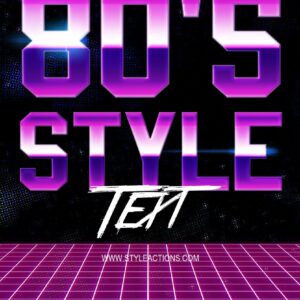
Layered Photoshop (PSD) template that produces an editable 80s-style text effect via a Smart Object; open the Smart Object, replace the text and save to apply the effect.
-
$6.99
PSD formatted Smart-Object product that applies an art/pop‑art (halftone, posterized) look to portraits; follow the Readme: open the Smart Object, paste your RGB 8‑bit photo and save (requires English Photoshop).
-

$6.99
Photoshop action that converts portrait photos into a stylized painterly/illustrative look using a Smart Object workflow; archive includes a PSD and a Readme with usage steps (RGB, 8‑bit, English Photoshop).
-

$9.99
Layered PSD flyer template for a ‘Back to 90s’ retro party that includes editable smart-object image replacement, master adjustment/color option groups and a Facebook preview PSD; uses SF UI Display and Brownhill Script (free) fonts.
-

$9.99
Layered Photoshop event/social-post template (PSD) for beer bar promotions featuring a hand-drawn beer mug, distressed background and headline; sized for an event page at 1920×1080 px and presented for Instagram/Facebook/Twitter use.
-

$9.99
Layered PSD event/social post template with a distressed ‘Beer Bar’ design featuring an illustrated beer mug; supplied as a 1920x1080px RGB PSD for use on Instagram, Facebook, Twitter and other platforms.
-

$6.99
Photoshop action/template that converts photos to a high-contrast black & white, halftone-style look; package includes a PSD smart-object example. Requires RGB, 8‑bit images and use of the PSD’s Smart Object (instructions provided in the Readme).
-
$6.99
Photoshop action-style product that creates a cartoon/painted portrait look; includes a layered PSD with a Smart Object — paste your photo into the Smart Object and save. Requires RGB, 8‑bit and the English version of Photoshop (see Readme).
-

$6.99
A Photoshop action that converts photos into cartoon/vector-style portraits with halftone dots, posterized shading and ink outlines; requires RGB 8-bit images and a Smart Object workflow as noted in the Readme.
-

$6.99
Photoshop PSD action that converts RGB 8‑bit photos into a colored circular-dot (halftone) portrait using a Smart Object; open the Smart Object, paste your photo and save to apply the effect. Ideal for posters, social graphics and retro/pop‑art styling.
-

$6.99
Photoshop action (as advertised) that turns photos into comic-book / pop-art style images with halftone dots, strong ink outlines and posterized shading; requires RGB 8‑bit images and use of a Smart Object per the readme. A layered PSD sample is included in the archive.
-
$6.99
Photoshop action that turns portraits into a comic-book / pop-art style using halftone dots, bold outlines and saturated color; includes a PSD smart-object template—open the Smart Object, replace your photo and save to apply. Readme requires RGB, 8-bit and English Photoshop.
-

$6.99
Photoshop text effect package (marketed as an action) that produces bold comic-book style headings; includes a layered PSD with a Smart Object — edit the Smart Object, save to update the effect. Preview shows a yellow/orange gradient headline with outlines, drop shadow, starburst explosion and speech bubble.
-
$6.99
A set of Photoshop actions (with a PSD smart-object) that convert RGB photos into a comic / oil-paint style portrait with bold outlines and posterized colour blocks; requires Photoshop English, RGB 8-bit images and pasting your photo into the provided Smart Object.
-

$6.99
Photoshop action that turns photos into a comic-style painted/halftone portrait using a provided layered PSD Smart Object. Requires RGB, 8‑bit images and the English version of Photoshop; open the Smart Object and paste your photo, then save to apply the effect.
-

$9.99
Layered Photoshop PSD using a Smart Object to turn editable text into a pop‑art / comic-book headline with halftone background, starburst, striped letter fill and colored extruded shadow. Open the Smart Object, edit the text and save to apply the effect.
