Burnt Wood Text Effect
$9.99Layered Photoshop .psd text effect that applies a burnt/charred wood look to typography; edit the included Smart Object to replace the text. Readme instructs to open the Smart Object, type your text and save.

Showing all 9 resultsSorted by price: low to high
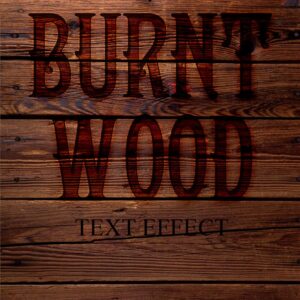
Layered Photoshop .psd text effect that applies a burnt/charred wood look to typography; edit the included Smart Object to replace the text. Readme instructs to open the Smart Object, type your text and save.

A Photoshop action packaged as a PSD with a Smart Object placeholder to apply exposure/lighting adjustments. Requires English Photoshop, an image in RGB color mode and 8‑bit color; open the Smart Object and paste your photo before saving.

High-resolution fire/flames overlay PNG that adds realistic flame and ember particles to photos and layouts; drag the overlay onto your image and set the layer blending mode to Screen or Overlay. Preview indicates a 5000 x 3000 px raster overlay.

Layered Photoshop (PSD) text effect that applies a realistic neon-sign glow to editable text via a Smart Object; open the PSD, edit the Smart Object text and save. Included readme contains basic usage steps.

Photoshop action packaged with a Smart‑Object PSD that applies realistic vertical rain streaks and a moody atmospheric look (visible reflection/wet effect). Requires RGB 8‑bit and the English version of Photoshop; Readme included.

Editable layered PSD flyer template titled “real guitar” intended for music/gig promotion; includes smart-object photo placeholder, organized color-option groups and master adjustment layers, and uses Futura_Book-Bold and Myriad Pro.

A Photoshop action for adding falling snow and a wintry atmosphere; supplied with a PSD (Smart Object) template and a Readme. Requires English Photoshop, RGB and 8‑bit images — open the Smart Object, paste your photo and save to apply the effect.

Layered PSD text-effect template that turns editable Smart Object text into a glossy water/liquid style and includes scattered water droplet decorations; open the Smart Object, replace text and save to apply. Intended for Photoshop (see included PSD and Readme).

Photoshop action that simulates a wet-glass/raindrop effect using a Smart Object; package includes a sample PSD and a Readme with usage steps (requires RGB, 8‑bit and English Photoshop).
Notifications