Glass Text Effects
$9.99Editable Photoshop PSD that applies a glass-style appearance to text using Smart Objects—open the PSD, edit the Smart Object text layer, save to update the effect.

Showing 61–80 of 142 resultsSorted by price: low to high

Editable Photoshop PSD that applies a glass-style appearance to text using Smart Objects—open the PSD, edit the Smart Object text layer, save to update the effect.

Layered PSD template that creates a glass-style, glossy 3D text effect over dramatic light-streak background. The archive contains a single file named ‘Glass Text.psd’ (note: product title references an “Action” but the archive provides a PSD).

A Photoshop glass-text effect titled as a PSD Action that ships with a layered PSD sample; creates glossy, transparent/metallic-looking type with colored light streaks and editable layers for posters and headers.

A Photoshop action packaged as a PSD that applies a glitch-style effect to photos using an editable Smart Object; requires RGB and 8‑bit images and the English version of Photoshop. Installation and usage steps are provided in the included Readme.

Photoshop ‘Glitch’ action package supplied with a Smart-Object PSD; applies a glitch/digital-distortion look to photos. Requires Photoshop (English), image in RGB color mode and 8‑bit; workflow: open the Smart Object, paste your photo and save.

A Photoshop ‘Glitch’ action package (titled Glitch PS Action 4) that includes a PSD with a Smart Object photo placeholder and a readme. Readme instructs using RGB, 8‑bit images and to paste your photo into the Smart Object and save to apply the effect.

A Photoshop package for producing a glitch-style text effect; edit your text inside the included Smart Object PSD and save to apply the effect. The product is presented as a PS Action-style workflow with an editable PSD.
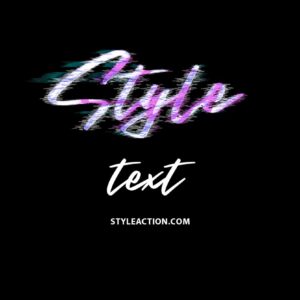
Photoshop action package that produces a glitch/distorted text effect and includes a layered PSD smart-object for easy text replacement; open the PSD, edit the smart object text and save to apply the effect.
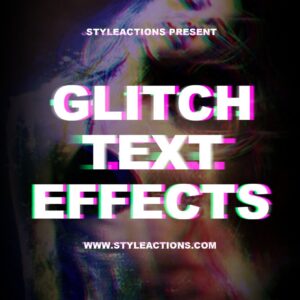
PSD template that applies a glitch/distorted text effect using an editable Smart Object — open the PSD, edit the Smart Object text and save to update the effect. Note: although the title includes “Action”, the archive contains a PSD template (Glitch Text.psd) and a Readme.

A Photoshop glowing/neon text effect package titled ‘Glowing Text Effects Photoshop Actions1’ delivered as a layered PSD with a Smart Object for editing text (Readme instructs opening the Smart Object and replacing text). Preview shows cyan/aqua neon lettering on a black background with a red ‘Premium Text Effect’ corner ribbon.

Photoshop action that applies a grunge/distressed effect to photos and includes a PSD with Smart Object placeholders. Requires English Photoshop and RGB 8‑bit images; open the Smart Object, paste your photo and save, then run the action.

Layered portrait-oriented PSD flyer template with a grunge/distressed texture treatment and Smart Object photo placeholder for easy image swaps; readme includes instructions and references a Photoshop action workflow. Suitable for event, music, fashion or artistic promotional materials.

A Photoshop action that converts photos into a distressed, halftone/sketch-style vintage portrait using Smart Object replacement; includes a PSD sample. Requires RGB, 8-bit Photoshop (English) and replacing the Smart Object with your photo.

A Photoshop action workflow (provided as a PSD with Smart Object) that converts photos into halftone/dot‑screen, screen‑print style images; requires RGB 8‑bit images and the English version of Photoshop. Replace the Smart Object photo, save and run the action to apply the effect.

Photoshop action with a Smart-Object PSD that converts photos into a hand-drawn / pencil-sketch portrait with paper texture. Requires an RGB 8‑bit image and uses a Smart Object workflow (open Smart Object, paste photo, save).

Photoshop action-style product (provided as a layered PSD with a Smart Object) that turns photos—especially portraits—into black-and-white ink-splatter artwork; requires Photoshop in English, RGB and 8‑bit images and replacing the Smart Object with your photo.
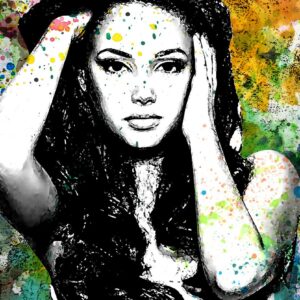
Photoshop action packaged with a PSD Smart Object that converts photos into high‑contrast ink-style portraits with colorful watercolor/splatter backgrounds. Readme notes require RGB, 8‑bit and the English version of Photoshop; replace the Smart Object photo and save to apply.

Editable Photoshop text effect that produces a bold, ink-splattered/distressed look; edit your copy inside the Smart Object in the supplied PSD and save to apply the effect.

Editable Photoshop text effect that produces a bold, ink-splattered/distressed look; edit your copy inside the Smart Object in the supplied PSD and save to apply the effect.

A Photoshop action-style product provided as a PSD with a Smart Object that applies a light glitch / RGB-channel split distortion to photos; open your image, paste it into the Smart Object and save to apply the effect. Requires Photoshop (English), RGB color mode and 8‑bit images as noted in the readme.
Notifications