Holographic Text Effect
$9.99Layered Photoshop (PSD) text-effect template that uses a Smart Object for easy editable holographic/iridescent text. Open the PSD in Adobe Photoshop, edit the Smart Object text and save to apply the effect.

Showing 21–40 of 40 resultsSorted by price: low to high

Layered Photoshop (PSD) text-effect template that uses a Smart Object for easy editable holographic/iridescent text. Open the PSD in Adobe Photoshop, edit the Smart Object text and save to apply the effect.

Creates an ice/frost-style text effect using an editable PSD Smart Object. Open ice text.psd, edit the Smart Object text and save to apply the effect (readme instructs editing the Smart Object).

Layered Photoshop PSD that applies glowing light and ray effects to text via a Smart Object; edit the Smart Object text and save to update the effect. Includes Readme with basic usage steps.

Layered Photoshop PSD text-effect template that produces a liquid/oil-style appearance; replace text by editing the included Smart Object as described in the Readme.

Layered Photoshop PSD that applies a metal/gold appearance to editable text via a Smart Object; open the Smart Object, replace your text and save to apply the effect.

A layered Photoshop (.psd) text-effect template that applies a metal-style appearance to editable text via a Smart Object — replace the Smart Object content with your text and save. Readme instructs opening the Smart Object, editing text, and saving.

A Photoshop PSD text-effect file that produces a metal/metallic appearance; edit your wording by opening and saving the included Smart Object. Archive contains ‘metal text.psd’ and a Readme with usage steps.

Editable Photoshop (.psd) Smart Object text effect that applies a metallic/foil appearance to text; open the Smart Object, edit your text, save to apply. Includes a layered PSD and a simple Readme with usage steps.

Layered Photoshop text effect that applies a neon + glitch style; replace the text inside the included Smart Object and save to update the effect. Delivered as a .psd with instructions in the Readme.
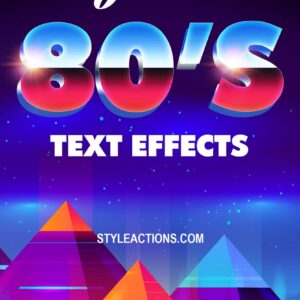
Editable Photoshop (.psd) text effect that applies an 80s-style appearance via a Smart Object; open the PSD, edit the Smart Object text and save to update the effect.

Photoshop text effect for creating a pencil-sketched look; includes a layered PSD with a Smart Object — open the Smart Object, replace text and save to apply. Supplied as a Photoshop-focused action/template for quick textured, hand-drawn typography.

Photoshop retro text effect that uses an editable Smart Object PSD to replace headline text; follow the Readme: open the PSD smart object, edit your text and save to apply the effect. The product title indicates a Photoshop action-style workflow and the archive contains a layered PSD.

Layered Photoshop PSD providing a silver/metallic text effect; edit the included Smart Object, replace the text and save to apply the effect. Delivered as a .psd file with instructions in the Readme.

A Photoshop .psd text-effect template that applies a silver/metallic style; edit the contained Smart Object, replace the text and save to update the effect. Readme instructs opening the Smart Object, entering text and saving.

Layered PSD text template that applies a smoked/smoky look to editable text via a Smart Object; open the PSD, edit the Smart Object text, save to update the effect.

Layered PSD text-effect template using a Smart Object: open the PSD, edit the Smart Object text and save to apply a glossy 3D “sweet” style; preview shows a decorative script and a corner ribbon accent.

Layered Photoshop PSD text-effect template that applies a “Sweet Text” style via a Smart Object; open the Smart Object, replace the text and save to update the effect. Includes a single .psd file and brief readme instructions.

Photoshop action package that produces a watercolor/painted text effect and includes a PSD with an editable Smart Object; open the Smart Object, replace text, save to apply the effect. Readme provides basic usage steps.
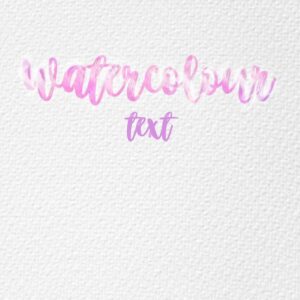
Layered Photoshop (PSD) text effect that applies a pink/purple watercolor brush fill to script lettering on a textured paper background; edit the included Smart Object to replace the sample text. Delivered as a PSD with a short README explaining Smart Object workflow.

A Photoshop ‘Zombie Text’ effect provided as a layered PSD with a Smart Object — open the smart object, replace the text and save to apply the effect. Intended for quickly producing zombie/horror-style headlines and titles.
Notifications