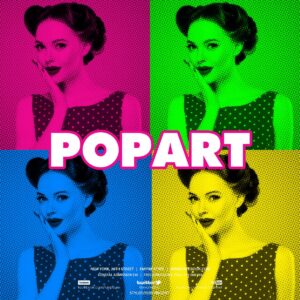
“Popart Photoshop Action” has been added to your cart.
View cart
Showing 21–29 of 29 resultsSorted by price: low to high
-
$6.99
Photoshop action with a PSD Smart Object template that turns photos into a high-contrast pop‑art/halftone duotone portrait; follow the Readme to place your image into the Smart Object (requires RGB, 8‑bit and English Photoshop).
-

$6.99
Photoshop Pop‑Art action with a Smart‑Object PSD that converts portrait photos into a halftone, posterized pop‑art look. Readme notes: use English Photoshop, RGB mode and 8‑bit images; open the Smart Object and paste your photo, then save to apply.
-

$6.99
PSD template that applies a pop-art style via a Smart Object workflow — open the Smart Object, paste your photo, save. Requires RGB, 8‑bit and English-version Photoshop according to the included Readme.
-

$6.99
Photoshop action that converts photos into a Warhol-style pop-art / halftone poster look; includes a PSD smart-object sample and requires RGB 8‑bit images and the English version of Photoshop. Install the action, open the provided PSD smart object, paste your photo and save to apply the effect.
-

$6.99
A Photoshop action workflow delivered with a PSD smart‑object that produces a bold, red‑intense posterised/illustrative portrait effect; intended for RGB 8‑bit images and requires opening and replacing the Smart Object (readme notes English Photoshop).
-

$6.99
Photoshop action delivered as an editable PSD that uses a Smart Object to turn photos into vector-like, posterized pop-art portraits with halftone and textured backgrounds. Requires RGB, 8‑bit and the English version of Photoshop; open the Smart Object and paste your photo, then save to apply the action.
-

$6.99
A Photoshop action and Smart-Object PSD that converts photos into a vector-like, pop-art poster style with halftone/background textures; requires RGB 8-bit images and the English version of Photoshop. Install and open the supplied PSD, replace the Smart Object photo and run the action.
-

$6.99
Photoshop actions that turn photos into a vintage comic-book / pop-art style using halftone dots, ink outlines and aged paper tones; package includes a sample PSD and requires an RGB 8‑bit image and use of a Smart Object in Photoshop (English).