Poster Effect PSD Action
$6.99Layered Photoshop PSD (Smart Object) that produces a textured, poster-style effect for portraits; includes a readme with usage instructions. Designed for use with RGB 8-bit images and Photoshop (English).

Showing 41–55 of 55 resultsSorted by price: low to high

Layered Photoshop PSD (Smart Object) that produces a textured, poster-style effect for portraits; includes a readme with usage instructions. Designed for use with RGB 8-bit images and Photoshop (English).
Photoshop action package that produces posterized, flat-color portrait artwork; includes a sample PSD and requires placing your photo into the Smart Object (RGB, 8-bit, English Photoshop).

Photoshop ‘Pro Cinematic’ action package (title/category indicate a PS action) that uses a PSD Smart Object to apply a moody, high-contrast cinematic color grade; readme notes require RGB, 8‑bit and English Photoshop. Archive includes a layered PSD with Smart Object and a Readme.txt.
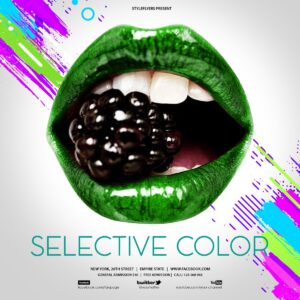
A Photoshop (PSD) template for creating animated Instagram content that uses a selective-color (color-splash) effect. Delivered as a layered PSD so you can open in Photoshop, edit layers/smart objects and export animation for social sharing.

A set of Photoshop actions aimed at creating street/urban stylised looks using a Smart Object workflow; includes a PSD sample and requires RGB 8‑bit images and the English version of Photoshop. Follow the Readme: open photo, edit/replace the Smart Object and save to apply the action.
Photoshop action delivered as a PSD with a Smart Object that converts portrait photos into high-contrast, flat‑color vector-style illustrations; requires RGB, 8‑bit and English Photoshop—open the Smart Object, paste your photo and save. Readme included.

A Photoshop action package named “Vector Art Photoshop Action 2” that includes a PSD with a Smart Object for dropping in photos; requires RGB 8‑bit and the English version of Photoshop. Follow the readme: open the PSD Smart Object, paste your photo, save, then run the action.

Photoshop action workflow provided as a Smart‑Object PSD that converts photos into a flattened vector/pop‑art style portrait. Requires RGB, 8‑bit source images and the English version of Photoshop; open the Smart Object, paste your photo and save to run the effect.

A Photoshop action package (distributed as a layered PSD) that produces a vector/illustration-style portrait by using a Smart Object for easy photo replacement; requires RGB, 8‑bit images and the English version of Photoshop. Open the provided Smart Object, paste your photo, save, then apply the action/effects in the PSD.

Photoshop action packaged with a Smart Object PSD that converts photos into a vector-style line-art/sketch look. Requires RGB, 8‑bit images and use of the Smart Object workflow (instructions in Readme).

Photoshop action that produces a vector-sketch / sketch-style effect and includes a layered PSD with a Smart Object for dropping in photos; requires RGB 8‑bit images and the English version of Photoshop. Instructions provided in the included Readme.

Photoshop action package that produces a vector-style sketch/line-art effect using a PSD smart-object template; install/open the PSD, edit the Smart Object by pasting your photo, and follow the included steps. Requires Photoshop in English, image in RGB and 8‑bit color mode per the Readme.

Photoshop action that applies a VHS-style camera/analog look to photos; includes a Smart Object PSD sample. Readme notes: use RGB, 8‑bit images and the English version of Photoshop; workflow requires pasting your photo into the Smart Object and saving.

Layered Photoshop PSD that applies a vintage/retro halftone and sepia portrait effect via a Smart Object; open the Smart Object, paste your photo, save to apply the effect (requires RGB, 8‑bit, English Photoshop).

A Photoshop action-style product (packaged with a PSD Smart Object) that applies a strong yellow monochrome/duotone look to photos; requires an RGB 8‑bit image and use of the Smart Object workflow as described in the included readme.
Notifications