Showing 21–40 of 50 resultsSorted by price: low to high
-

$9.99
Layered Photoshop PSD with a glowing/neon text effect applied via a Smart Object; open the Smart Object, replace the text and save to update the effect. Includes a brick-wall background and a corner ribbon accent visible in the preview.
-

$6.99
Packaged as a ‘Gold Text PS Action’, this product includes a layered PSD with a Smart Object to create a glossy 3D gold luxury text effect; edit the Smart Object text and save to apply the effect. Readme provides brief usage instructions.
-

$6.99
Photoshop action that applies a two‑tone gradient/duotone color grade; includes a layered PSD using a smart object — insert your photo into the smart object and save to apply. Requires Photoshop (English), image in RGB and 8‑bit per the included Readme.
-

$6.99
Photoshop action packaged as a PSD with a Smart Object for applying a two‑tone gradient/duotone color wash to photos; replace the Smart Object with your RGB (8‑bit) photo and save to apply. Readme notes require English Photoshop and an RGB 8‑bit image.
-

$6.99
Photoshop action-oriented product (includes a PSD Smart Object) that produces a dramatic heroic “fire-and-ice” poster look with smoke, particles and glowing edges; insert your photo into the Smart Object, save, and follow the supplied instructions (requires RGB 8‑bit and English Photoshop).
-
$9.99
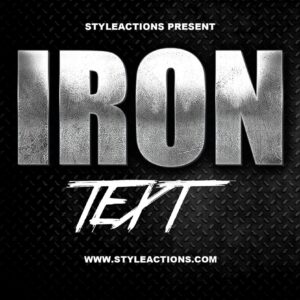
Layered PSD text-effect template that converts editable Smart Object text into a distressed metallic/iron headline with diamond-plate background; edit the Smart Object to replace text and save. Includes layered effects for quick customization.
-

$6.99
Single PNG photo overlay of colored light leaks, rays, bokeh and small sparkles (advertised 5000×3000 px at 300 DPI). Place over an RGB/8‑bit image and set blending mode to Screen or Overlay (readme recommends Photoshop/English).
-

$6.99
A Photoshop action-style product provided as a PSD with a Smart Object that applies a light glitch / RGB-channel split distortion to photos; open your image, paste it into the Smart Object and save to apply the effect. Requires Photoshop (English), RGB color mode and 8‑bit images as noted in the readme.
-
$6.99
Colourful light-leaks / bokeh overlay texture showing translucent circular highlights over a soft multicolour gradient; use as an overlay or decorative background to add dreamy, glowing effects to photos and layouts.
-

$6.99
A Photoshop ‘Matte’ action workflow delivered as a PSD with a Smart Object; applies a matte, cinematic color grade suitable for portraits and fashion/lifestyle images. Readme instructs using RGB 8‑bit images and replacing the Smart Object content to apply the effect.
-

$6.99
Photoshop action package with an editable PSD smart-object that produces a yellow/gold neon light text effect on a brick-wall background; edit the smart object text and save to apply the effect. Readme instructs opening the Smart Object, replacing text and saving.
-

$9.99
Photoshop PSD smart-object template that produces a neon light/glow text effect — open the Smart Object, replace your text and save to apply the neon styling. Supplied as a layered PSD (instructions in Readme).
-

$6.99
A Photoshop-style neon effect supplied as a PSD that uses a Smart Object to apply a cyan/teal neon glow and high-contrast stylization to portraits. Readme notes require Photoshop (English), RGB color mode and 8‑bit images; replace the Smart Object with your photo and save.
-

$6.99
Photoshop action that creates a neon, RGB-split glowing look for photos; includes a sample PSD with a Smart Object. Requires RGB, 8-bit images and the English version of Photoshop.
-

$9.99
Layered Photoshop PSD text effect that applies a neon/glow look — edit the Smart Object, type your text and save to update the effect. Includes a readme with simple Smart Object instructions.
-

$6.99
Photoshop ‘Neon Text PS Action’ package that includes a Smart-Object PSD for editable neon-style text; open the PSD, edit the Smart Object text and save to apply the effect as described in the readme.
-

$9.99
Layered Photoshop (PSD) file providing a neon-style text effect editable via a Smart Object — open the Smart Object, replace the text and save to update the effect.
-

$6.99
Photoshop action package that produces a painted / cartoon-style portrait look using a Smart Object PSD; designed for portrait photos and quick stylised retouching. Readme notes require RGB, 8-bit images and the English version of Photoshop; open the PSD’s Smart Object and paste your photo, then save.
-

$6.99
Photoshop action package (provided as a PSD with a Smart Object) that applies a professional duotone color grade to photos; requires RGB 8‑bit images and English Photoshop—open the Smart Object, paste your photo and save to apply.
-

$6.99
A Photoshop action package (labelled ‘Red Selection’) that works via a Smart Object PSD to automate a red-focused selection or color-emphasis workflow; requires RGB, 8‑bit images and the English version of Photoshop. Archive includes a Red Selection.psd and a Readme with usage steps.
