Showing 41–60 of 71 resultsSorted by price: low to high
-

$9.99
Layered Photoshop (PSD) text-effect template that applies a metal-style treatment via an editable smart object; open the smart object, replace your text and save to apply the effect. Includes a Readme with brief usage instructions.
-

$6.99
A Photoshop text effect marketed as a ‘Metal Text Photoshop Action’ that includes a layered PSD with a Smart Object for easy text replacement and produces a metallic, 3D/beveled text look on a grungy background.
-

$6.99
A Photoshop PSD text-effect file that produces a metal/metallic appearance; edit your wording by opening and saving the included Smart Object. Archive contains ‘metal text.psd’ and a Readme with usage steps.
-

$6.99
A Photoshop PSD action that transforms photos into mixed-media portrait artwork using a Smart Object-based PSD; adds paint splatters, halftone and canvas-style textures. Readme notes: use RGB, 8‑bit and English Photoshop; open Smart Object and paste your photo.
-

$6.99
A Photoshop action that converts photos into a layered ink/paint splatter portrait look using a Smart Object PSD. Readme notes require RGB, 8‑bit images and the English version of Photoshop; insert your photo into the Smart Object and save to apply the action.
-

$6.99
Photoshop ‘Monochromes’ action packaged as a PSD that converts RGB 8‑bit photos to a high-contrast monochrome look using a Smart Object — open your photo, paste into the Smart Object and save to apply. Preview shows an editorial portrait with halftone texture and horizontal banner overlays.
-

$6.99
Photoshop action that transforms photos into a newsprint/newspaper-style portrait using halftone, newspaper-text backgrounds and aged paper textures; includes a PSD with Smart Object. Requires RGB, 8‑bit images and English Photoshop — open the Smart Object, paste your photo and save.
-

$6.99
Photoshop action combined with a layered PSD Smart Object template that produces a particle dispersion / disintegration effect; requires an RGB, 8‑bit photo and the English version of Photoshop — paste your photo into the Smart Object and save to apply the action.
-

$6.99
Photoshop action that applies a pink/magenta duotone look using a Smart Object PSD; includes a sample PSD and Readme. Requires RGB, 8‑bit images and the English version of Photoshop.
-

$6.99
Photoshop action that turns photos into a pixel/mosaic poster-style image using a Smart Object workflow; requires RGB 8-bit and the English version of Photoshop. Archive contains a layered PSD and Readme with setup steps.
-

$6.99
Photoshop Pop‑Art action with a Smart‑Object PSD that converts portrait photos into a halftone, posterized pop‑art look. Readme notes: use English Photoshop, RGB mode and 8‑bit images; open the Smart Object and paste your photo, then save to apply.
-

$6.99
PSD template that applies a pop-art style via a Smart Object workflow — open the Smart Object, paste your photo, save. Requires RGB, 8‑bit and English-version Photoshop according to the included Readme.
-
$6.99
Photoshop action package that produces posterized, flat-color portrait artwork; includes a sample PSD and requires placing your photo into the Smart Object (RGB, 8-bit, English Photoshop).
-

$6.99
Photoshop action packaged with a PSD Smart Object template that applies realistic fire and glowing-edge effects to a subject photo; requires RGB 8‑bit images and the English version of Photoshop—open the Smart Object, paste your photo and save.
-
$9.99
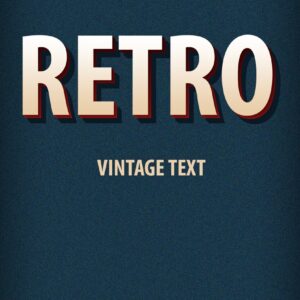
Layered Photoshop text effect (PSD) that creates a retro / vintage 3D headline style with textured background and corner ribbon; edit the text through the included Smart Object. Included file: Retro Vintage Text Effects.psd (see Readme for usage).
-

$6.99
A Photoshop action that creates a colorful sand/powder/paint-splash dispersion effect around a subject using a Smart Object workflow. Requires an RGB, 8‑bit image and the English version of Photoshop — open the Smart Object and paste your photo as instructed in the Readme.
-

$6.99
Photoshop action delivered as a PSD that uses a Smart Object to create a shattered/dispersion effect on photos. Requires an RGB, 8‑bit image and the English version of Photoshop; open the Smart Object and paste your photo to run the effect (instructions in the included Readme).
-

$9.99
Layered PSD text template that applies a smoked/smoky look to editable text via a Smart Object; open the PSD, edit the Smart Object text, save to update the effect.
-

$6.99
A Photoshop actions pack for producing splash-art / paint-splatter photo effects; package includes a layered PSD with a Smart Object placeholder and a readme. Requires RGB, 8‑bit images and the English version of Photoshop.
-

$9.99
Layered PSD text-effect template named ‘Spot Text’ that uses a Smart Object for editable text—open the Smart Object, replace the text and save to update the effect.
