Glass Text PSD Flyer Template
$9.99Portrait layered PSD flyer template that applies a glossy glass/3D effect to editable text via a Smart Object; includes shattered-glass visual elements and a preview for quick customization.

Showing 21–40 of 60 resultsSorted by price: low to high
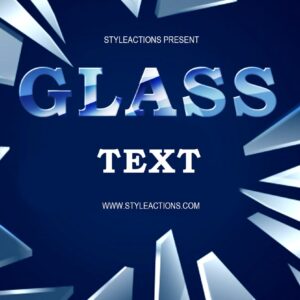
Portrait layered PSD flyer template that applies a glossy glass/3D effect to editable text via a Smart Object; includes shattered-glass visual elements and a preview for quick customization.

Photoshop action package for producing a glitch/distortion look (RGB/channel split, horizontal scanlines and color fringing) using a Smart Object; requires an RGB, 8‑bit image and English Photoshop.

Photoshop action workflow delivered with an editable PSD Smart Object that creates horizontal glitch/distortion effects with scanlines, channel splitting and digital noise. Requires an RGB, 8‑bit photo and English Photoshop — open the Smart Object, paste your image and save to apply the effect.

Photoshop ‘Glitch’ action package supplied with a Smart-Object PSD; applies a glitch/digital-distortion look to photos. Requires Photoshop (English), image in RGB color mode and 8‑bit; workflow: open the Smart Object, paste your photo and save.

A Photoshop action package that applies a glitch/digital-distortion effect and includes a layered PSD smart-object template; requires Photoshop (RGB, 8‑bit, English). Follow the Readme to open the smart object and replace your photo.

Photoshop action that applies a glitch/digital-distortion style to images; includes a PSD with a Smart Object — open the Smart Object, paste your photo and save. Requires Photoshop (English version), RGB color mode and 8‑bit images as noted in the readme.

A Photoshop action that applies glitch/digital distortion effects; includes a PSD Smart Object template for inserting your photo. Requires Photoshop (English), image in RGB and 8‑bit, and editing the Smart Object to replace the photo.
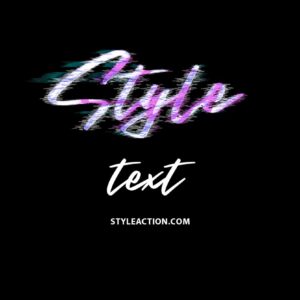
Photoshop action package that produces a glitch/distorted text effect and includes a layered PSD smart-object for easy text replacement; open the PSD, edit the smart object text and save to apply the effect.
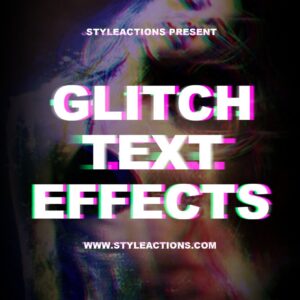
PSD template that applies a glitch/distorted text effect using an editable Smart Object — open the PSD, edit the Smart Object text and save to update the effect. Note: although the title includes “Action”, the archive contains a PSD template (Glitch Text.psd) and a Readme.

Layered, print-ready PSD flyer template called “glow” with smart-object image replacement, pre-installed color option groups and master adjustment layers; fonts referenced in the readme (Myriad Pro, Futura Light, COCOMAT).

Layered Photoshop PSD with a glowing/neon text effect applied via a Smart Object; open the Smart Object, replace the text and save to update the effect. Includes a brick-wall background and a corner ribbon accent visible in the preview.

A Photoshop glowing/neon text effect package titled ‘Glowing Text Effects Photoshop Actions1’ delivered as a layered PSD with a Smart Object for editing text (Readme instructs opening the Smart Object and replacing text). Preview shows cyan/aqua neon lettering on a black background with a red ‘Premium Text Effect’ corner ribbon.

Photoshop action that produces a metallic gold color treatment for photos; includes a sample layered PSD and runs via a Smart Object (requires RGB 8-bit and English Photoshop). Replace the Smart Object image and save to apply the effect.
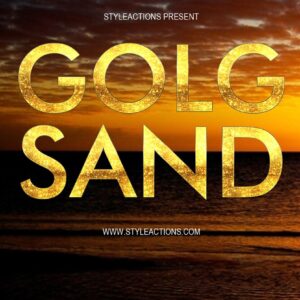
Layered Photoshop PSD text-effect template that applies a gold/sand textured finish to uppercase display text via an editable Smart Object; open the Smart Object, replace text and save to update the effect.

A Photoshop action that creates a grunge/distressed look for photos; usage requires placing your photo into the Smart Object and running the action (Photoshop should be English, RGB and 8‑bit).

Photoshop action-oriented product (includes a PSD Smart Object) that produces a dramatic heroic “fire-and-ice” poster look with smoke, particles and glowing edges; insert your photo into the Smart Object, save, and follow the supplied instructions (requires RGB 8‑bit and English Photoshop).

Layered Photoshop PSD that applies glowing light and ray effects to text via a Smart Object; edit the Smart Object text and save to update the effect. Includes Readme with basic usage steps.

A Photoshop action-style product delivered as a layered PSD with a Smart Object for inserting your photo; it applies dramatic, cinematic storm/particle effects and colour grading ideal for fashion and portrait images. Readme notes require RGB, 8‑bit images and the English version of Photoshop.

Layered Photoshop PSD text effect using a Smart Object: edit the Smart Object with your text, save to apply a bold metallic/chrome style layered over an ember/spark background for poster or title graphics.

Layered PSD flyer template named “Minimal Flyer 2” with smart-object image replacement, master adjustment layers and pre-installed color option groups; archive includes a separate Facebook cover PSD. Readme notes organized, color-coded groups and that the free font “Code” is used.
Notifications