Oil Painting Photoshop Action 2
$6.99Photoshop action package to turn photos into an oil-painting style using a Smart Object workflow; includes a layered PSD and Readme. Requires RGB, 8‑bit images and the English version of Photoshop.

Showing 41–60 of 103 resultsSorted by price: low to high

Photoshop action package to turn photos into an oil-painting style using a Smart Object workflow; includes a layered PSD and Readme. Requires RGB, 8‑bit images and the English version of Photoshop.

A Photoshop action package that produces an oil-painting look and includes a layered PSD Smart Object template; workflow requires opening the Smart Object and pasting your photo. Readme notes: image must be RGB, 8‑bit, and used with the English version of Photoshop.

A Photoshop action package that applies an oil-painting style to photos; includes a PSD with a Smart Object placeholder for replacing the photo. Readme notes the image must be RGB, 8‑bit and used with the English version of Photoshop (open the Smart Object, paste your photo and save).

A Photoshop action that applies an oil-paint / painterly effect to photos; delivered as a PSD that uses a Smart Object—requires Photoshop (English), RGB 8-bit and placing your image into the Smart Object as described in the Readme.

A Photoshop action that creates an oil-paint / painterly look using a PSD with a Smart Object — place your RGB 8‑bit photo into the Smart Object and save, then run the action.

Photoshop action that converts photos into a layered black-and-white pencil sketch using a Smart Object; requires RGB 8‑bit images and the English version of Photoshop. Includes a PSD and Readme with usage instructions.

Photoshop action that converts photos into a layered black-and-white pencil sketch using a Smart Object; requires RGB 8‑bit images and the English version of Photoshop. Includes a PSD and Readme with usage instructions.

A Photoshop action-style workflow delivered as a layered PSD with a Smart Object for turning portrait photos into an oil-painting look; README notes require RGB, 8‑bit and the English version of Photoshop and instructs placing your photo into the Smart Object and saving.

Photoshop action package with a PSD that contains a Smart Object; paste your photo into the Smart Object and run the action to create a realistic painting-style effect. Requires RGB, 8‑bit images and the English version of Photoshop.

Photoshop action package that creates a realistic painting effect from photos using a layered PSD with a Smart Object. Requires Photoshop (English) and RGB 8‑bit images — open the Smart Object, paste your photo and save to apply.

A Photoshop PSD text-effect template that uses a Smart Object for editable text to produce a retro/vintage typographic effect; open the Smart Object, edit the text, save to apply. Delivered as a layered PSD (no preview included).
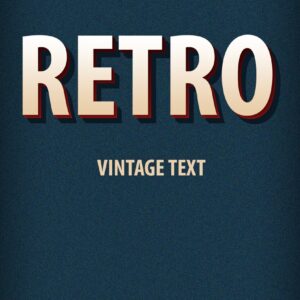
Layered Photoshop text effect (PSD) that creates a retro / vintage 3D headline style with textured background and corner ribbon; edit the text through the included Smart Object. Included file: Retro Vintage Text Effects.psd (see Readme for usage).

Two layered PSD templates for promoting a retro/classic car club or event — includes a flyer PSD and a Facebook cover PSD (filenames: rectro_car_club.psd, retrocar_facebook_cover.psd). Designed for automotive club promotions and vintage car events.

Editable layered PSD flyer template for a Save-the-Date wedding invitation; includes replaceable image placeholder, master adjustment layers and pre-installed color option groups, and is set up with print bleed. Readme lists included fonts (Vladimir Script, Palatino Linotype) and basic editing instructions.

Sepia Filter Photoshop Action (product labeled as an action) that produces a warm sepia vintage look; archive includes a PSD Smart Object sample and a Readme with usage notes (requires RGB 8-bit and English Photoshop; paste your photo into the Smart Object).

A Photoshop PSD action that applies a silver/metallic-tone treatment to photos via a Smart Object; requires RGB 8‑bit and the English version of Photoshop. Package includes a PSD (Smart Object) and Readme with usage steps.

A Photoshop effect package that uses a layered PSD with a Smart Object to produce a smooth oil-painting look from photos; the Readme instructs placing your RGB 8‑bit image into the Smart Object and saving to apply the effect.

A Photoshop PSD action workflow that applies a vintage black-and-white/monochrome effect; delivered as a layered PSD with a Smart Object that you replace with your RGB 8‑bit photo. Readme includes usage steps and Photoshop requirements.

A Photoshop action packaged with a PSD that uses a Smart Object to apply a vintage sepia toning to photos; the readme instructs using RGB, 8‑bit images and the English version of Photoshop. The package contains a PSD (Smart Object) and a Readme.txt with usage steps.

Layered Photoshop PSD text-effect template that applies a vintage/retro style to text; edit the included Smart Object to replace text and save to update the effect. Supplied as a PSD file for export to web or print.
Notifications