Showing 341–360 of 508 resultsSorted by price: low to high
-

5,00 €
Photoshop action that converts photos into a layered black-and-white pencil sketch using a Smart Object; requires RGB 8‑bit images and the English version of Photoshop. Includes a PSD and Readme with usage instructions.
-
5,00 €
Photoshop action workflow (with a layered PSD Smart Object) that converts photos into a black-and-white pencil-sketch portrait; requires RGB 8-bit images and the English version of Photoshop. Includes a sample PSD to drop your photo into the Smart Object and save to apply the effect.
-

5,00 €
A Photoshop action-style product that produces a pencil-sketch / hand-drawn look using a layered PSD with a Smart Object; requires RGB, 8‑bit images and the English version of Photoshop (instructions included).
-
5,00 €
Photoshop Action that converts photos into a textured pencil-sketch look; includes a Smart Object PSD sample and requires RGB 8‑bit images and the English version of Photoshop. Install and run the action, then paste your photo into the PSD’s Smart Object and save to apply the effect.
-

5,00 €
Photoshop PSD action/template that applies a bold pink/magenta duotone and high-contrast stylised look to portraits via a Smart Object; requires RGB, 8‑bit and English Photoshop. Ideal for fashion, beauty and social/poster graphics.
-

5,00 €
Layered PSD that applies a pink duotone styling via a Smart Object workflow; open the PSD, replace the Smart Object contents with your RGB 8-bit photo and save to apply. Readme notes require RGB, 8-bit, and the English version of Photoshop.
-

5,00 €
PSD-based Photoshop action that applies a pink duotone/tint and a promotional-style black headline banner; replace the Smart Object content with your RGB 8‑bit photo and save. Readme notes require English Photoshop and an RGB 8-bit image.
-

5,00 €
Photoshop Action (delivered with a PSD Smart-Object template) that creates a square-pixel dispersion/disintegration effect for portraits. Readme notes: use an RGB, 8‑bit image and paste your photo into the Smart Object, then save to apply the effect.
-

5,00 €
A Photoshop action setup delivered with a PSD smart-object template that converts photos into a pixelated/halftone, posterized portrait look — requires RGB 8-bit images and English Photoshop; replace the image inside the Smart Object and save.
-

5,00 €
Photoshop Action that generates a pixelated / mosaic square-block effect; includes a layered PSD with a Smart Object sample and a Readme. Requires RGB, 8‑bit images and the English version of Photoshop — open the Smart Object and paste your photo then run the action.
-

5,00 €
Photoshop action packaged with a layered PSD that applies a polygonal/low‑poly stylized portrait with triangular facets and mesh overlays; requires placing your photo into the included Smart Object (RGB, 8‑bit, English Photoshop).
-

5,00 €
Named ‘Polygon Photoshop Action’, this product creates a polygon/hexagonal mosaic look for portraits; archive contains a layered PSD example and a preview JPG. Useful for creating stylized, geometric editorial and social images.
-
5,00 €
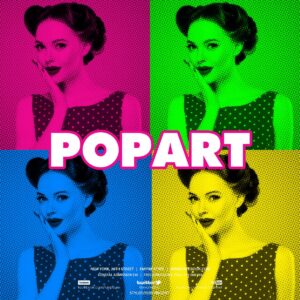
Photoshop action with a PSD Smart Object template that turns photos into a high-contrast pop‑art/halftone duotone portrait; follow the Readme to place your image into the Smart Object (requires RGB, 8‑bit and English Photoshop).
-

5,00 €
A portrait-focused Pop‑Art Photoshop PSD using a halftone/duotone treatment with an editable Smart Object — paste your photo into the Smart Object (RGB, 8‑bit) and save to apply the effect; suitable for posters, flyers and social posts.
-

5,00 €
Photoshop action package that converts photos into pop‑art, halftone‑style portraits; includes a layered PSD with a Smart Object and a Readme. Requires Photoshop (RGB, 8‑bit) — open the Smart Object, paste your image and save to apply the effect.
-

5,00 €
Photoshop action package that converts portrait photos into a bold pop‑art poster look; includes a PSD with a Smart Object workflow. Requires RGB 8‑bit images and the English version of Photoshop — open the Smart Object, paste your photo, save, then run the action.
-

5,00 €
A Photoshop Actions pack that converts photos into a pop‑art, posterized portrait style; includes a PSD sample with a Smart Object for easy photo replacement and a readme with usage notes (RGB, 8‑bit, English Photoshop).
-

5,00 €
Photoshop Pop‑Art action with a Smart‑Object PSD that converts portrait photos into a halftone, posterized pop‑art look. Readme notes: use English Photoshop, RGB mode and 8‑bit images; open the Smart Object and paste your photo, then save to apply.
-

5,00 €
Photoshop action that converts photos into a Warhol-style pop-art / halftone poster look; includes a PSD smart-object sample and requires RGB 8‑bit images and the English version of Photoshop. Install the action, open the provided PSD smart object, paste your photo and save to apply the effect.