Showing 141–160 of 174 resultsSorted by price: low to high
-

$6.00
A Photoshop retouch-action package delivered as a layered PSD containing a Smart Object for your photo plus a Readme; instructions require RGB 8-bit images and the English version of Photoshop. Use by opening the PSD’s Smart Object, placing your photo, saving, and running the included action workflow.
-

$6.00
Photoshop retouching action packaged as a PSD that uses a Smart Object workflow — paste your photo into the Smart Object and save to apply. Requires RGB, 8‑bit images and the English version of Photoshop.
-

$6.00
Photoshop action that produces a retro/vintage sketch-and-watercolor portrait look; includes a PSD with a Smart Object for replacing the photo. Requires Photoshop (English), RGB color mode and 8‑bit images as noted in the Readme.
-

$6.00
A Photoshop action with a supplied PSD smart-object template that applies a sand-textured, high‑fashion portrait retouch; insert your photo into the Smart Object (RGB, 8-bit, English Photoshop) and run the action.
-

$6.00
Photoshop action delivered as a PSD with a Smart Object that produces a scattered-particle/dispersion portrait effect; requires an RGB 8‑bit photo and the English version of Photoshop. Includes a layered PSD ready for swapping your image into the Smart Object.
-

$8.00
Contains PSD template files named facebook_cover.psd and preview_seduction.psd for a flyer product titled “seduction”; intended as editable PSD templates for promotional or event use (editable in Photoshop or compatible editors).
-
$8.00
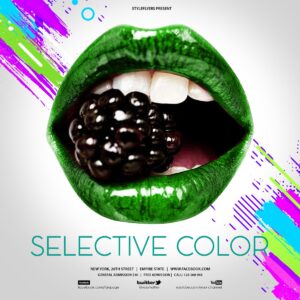
A layered Photoshop (PSD) template for animated Instagram posts that implements a selective-color (color-pop) effect. Includes an editable PSD intended for use as an animated social post with photo and text placeholders.
-

$6.00
Photoshop workflow (PSD with Smart Object) for creating selective-color ‘color pop’ portraits — desaturates most of the image while preserving/isolating a chosen color. Readme notes require RGB 8‑bit and the English version of Photoshop; drop your photo into the Smart Object and save.
-

$8.00
Editable Photoshop (.psd) flyer template titled “Shopping Day flyer” intended for promoting shopping events, sales and retail promotions. Archive includes the PSD source file and a readme PDF.
-

$6.00
A Photoshop PSD action/template that produces a silver-toned monochrome portrait effect; use the included Smart Object workflow to place your RGB 8‑bit photo and save to apply the effect.
-

$6.00
Photoshop action that converts photos into a colored sketch/drawing look; includes a layered PSD with a Smart Object — copy your photo into the Smart Object, save, and run the action. Requires RGB 8‑bit images and the English version of Photoshop.
-

$6.00
Photoshop action that converts photos into detailed pencil/sketch illustrations with cross-hatch shading and optional selective color accents; includes a layered PSD (uses Smart Object) and requires RGB 8‑bit images and the English version of Photoshop. Ideal for portraits and fashion/editorial imagery where a handcrafted sketch look is desired.
-

$6.00
Photoshop action package for skin retouching in portraits; includes a PSD with a Smart Object workflow. Requires Photoshop (English), images in RGB color and 8‑bit mode — open the Smart Object, paste your photo and save to apply.
-

$6.00
Photoshop action for skin and beauty retouching that includes a PSD with a Smart Object; place your photo into the Smart Object and follow the Readme instructions. Requires RGB, 8‑bit images and the English version of Photoshop.
-

$6.00
A Photoshop PSD template that applies skin-retouching actions via a Smart Object workflow; includes a Readme with usage steps and requires RGB 8‑bit and the English Photoshop build. Replace the Smart Object photo and save to apply the retouch actions.
-

$6.00
Photoshop action that creates colored double lighting and smoke/atmospheric effects for portraits; includes a PSD (Smart Object) and readme with usage steps. Requires Photoshop (English), images in RGB and 8‑bit as noted in the readme.
-
$6.00
Photoshop action packaged as a PSD that applies a smoky overlay / stylised portrait effect via a Smart Object; requires RGB, 8‑bit images and the English version of Photoshop. Includes a PSD (open Smart Object and paste your photo, then save to apply).
-

$6.00
Photoshop action packaged as a layered PSD that adds heavy falling-snow / blizzard effects and cold toning to portrait photos; includes a Smart Object workflow. Requires RGB, 8‑bit images and the English version of Photoshop (see Readme for usage steps).
-

$6.00
Photoshop ‘Soft Focus’ action packaged as a PSD with a Smart Object: replace your photo inside the Smart Object and save to apply a soft-focus, skin‑smoothing glow and warm tonal grade. Readme notes require Photoshop (English), RGB color mode and 8‑bit images.
-

$6.00
Photoshop action packaged as a Smart Object PSD that applies a soft gradient color wash and sharpening/detail enhancement to portraits; requires RGB 8‑bit images and using the Smart Object workflow (open, replace photo in Smart Object, save).
