Aquarelle Photoshop Action
$6.99Photoshop action that converts photos into an aquarelle/watercolor-style portrait and includes a PSD with a Smart Object for dropping in images; requires English Photoshop, RGB and 8‑bit images.

Showing all 16 resultsSorted by price: low to high

Photoshop action that converts photos into an aquarelle/watercolor-style portrait and includes a PSD with a Smart Object for dropping in images; requires English Photoshop, RGB and 8‑bit images.

Photoshop product that produces a watercolor-style portrait using a layered smart-object PSD (includes Art Watercolor Photoshop Action.psd and Readme). Requires RGB, 8‑bit images and the English version of Photoshop; place your photo into the Smart Object and save.

Photoshop action that produces an artistic watercolor / mixed-media portrait look and includes a Smart Object PSD for dropping in photos; readme notes RGB, 8‑bit and English Photoshop requirements.

Photoshop action package that produces a color-sketch/illustrative look; includes a layered PSD with a Smart Object where you replace your photo and follow the Readme instructions (requires RGB, 8‑bit and English Photoshop).

Photoshop Action that turns photos into an edge‑focused oil painting look; includes a PSD with a Smart Object. Readme notes require RGB, 8‑bit images and the English version of Photoshop — paste your photo into the Smart Object and save to apply the effect.
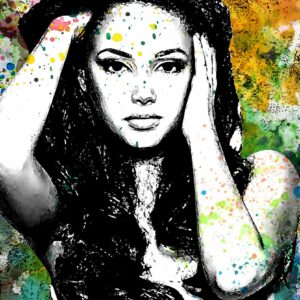
Photoshop action packaged with a PSD Smart Object that converts photos into high‑contrast ink-style portraits with colorful watercolor/splatter backgrounds. Readme notes require RGB, 8‑bit and the English version of Photoshop; replace the Smart Object photo and save to apply.

Photoshop action that converts photos into a stylized mixed-painting portrait using a supplied Smart Object PSD; package includes a PSD example and readme with usage steps (copy photo into Smart Object, save). Readme notes RGB, 8‑bit and English Photoshop requirements.

Photoshop action packaged as a Smart-Object PSD that converts photos into a pencil-sketch, paper-textured look; includes a readme with usage steps (requires RGB 8-bit and English Photoshop). Open the Smart Object, paste your photo, save and run.

Photoshop Action that converts photos into a pencil-style, vintage-art look using a Smart-Object PSD; requires RGB, 8-bit images and the English version of Photoshop. Archive includes a layered PSD (Smart Object) and a Readme with usage steps.

A Photoshop action delivered as a PSD that turns photos into a smooth oil-paint, painterly look using a Smart Object workflow; requires RGB, 8‑bit and the English version of Photoshop. Open the Smart Object, paste your photo, save and the action/template applies the effect.

Photoshop action (Smart Object workflow) that converts photos into watercolor-style splash and paint-splatter artworks and outputs an editable PSD; requires RGB, 8‑bit images and the English version of Photoshop. Readme instructs opening the Smart Object and pasting your photo to apply the effect.

Smart-object Photoshop action / layered PSD that converts portrait photos into modern splashed watercolor artwork; readme instructs using an RGB 8‑bit photo and replacing the Smart Object. Requires Photoshop (English).

Photoshop action that produces a watercolor, mixed-media painterly look for photos; sample layered PSD is included and the action workflow uses Smart Objects (requires RGB 8-bit and English Photoshop).

Photoshop action-style product intended to create a watercolor/painterly look for photographs; package includes a PSD (Smart Object) sample and a Readme with usage notes. Readme specifies the image must be RGB, 8‑bit and that Photoshop (English) Smart Object workflow is used.

Photoshop action that converts photos into a watercolor-style portrait look; includes a layered PSD with a Smart Object for replacing the photo. Requires RGB, 8-bit and the English version of Photoshop as noted in the readme.

Photoshop action packaged with a smart-object PSD that turns photos into watercolor-style painted portraits; requires Photoshop (English), RGB color mode and 8‑bit images — open the smart object, paste your photo and save.
Notifications